Settings
Configuring the CarGurus badge can be done by editing your listing type, then under Settings there will be a CarGurus Badge tab:
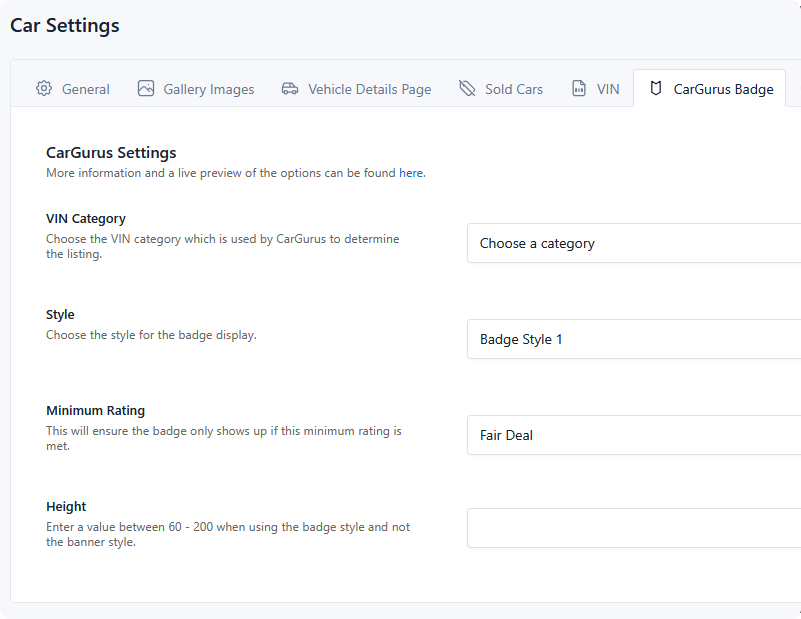
These settings apply to every badge on that listing type. The element itself only controls alignment, so a change here affects each place the badge appears at once.
CarGurus publishes a live preview of the style options in their own Deal Rating Badge documentation.
VIN Category
Choose your VIN category so this can be passed to CarGurus with the price to determine the deal rating.
The dropdown lists every category on the current listing type; pick the one whose value is the vehicle's VIN. Until this is set, the badge element renders nothing at all — see Troubleshooting.
Style
CarGurus offers multiple styles of badges. Two are compact badges sized by the Height setting; five are fixed-size banners.
Badge Style 1

Badge Style 2

Banner Style 1 — 900 × 60 px

Banner Style 2 — 900 × 42 px

Banner Style 3 — 748 × 42 px

Banner Style 4 — 550 × 42 px

Banner Style 5 — 374 × 42 px

Banner widths are fixed by CarGurus. Pick one that fits the narrowest place you intend to show it — a 900 px banner in a search result column will overflow or be clipped. For search result rows, the compact badge styles usually work better.
Minimum Rating
This lets you control the minimum rating required for the badge to display:
| Setting | Badge shows for |
|---|---|
| Fair Deal | Fair, Good, and Great deals |
| Good Deal | Good and Great deals |
| Great Deal | Great deals only |
Anything below the threshold renders nothing — no placeholder, no empty box. A stricter setting means fewer listings carry a badge, but every badge shown is a strong one.
Height
This value is only used for Badge Style 1 and Badge Style 2. If you are using a banner style you can disregard this setting.
Enter a value between 60 and 200. It sets the badge's height in pixels; the width scales with it.
Once configured, add the badge to a template — see Badge Element.