Fuel Efficiency Element
Adding the element is done by dragging or selecting the Listing Fuel Efficiency element into your page builder's content:
It's available in the VDP and SRI (Search Result Item) categories, so it can sit on a listing detail page or on each search result row.
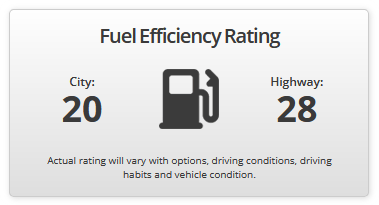
Here's an example of what the settings can produce:
Settings
| Setting | Description | Default |
|---|---|---|
| Title | Optional heading above the values. | — |
| Description | Optional text below the values. Good place for a disclaimer about estimated ratings. | — |
| City Label | Text above the city figure. | City |
| Highway Label | Text above the highway figure. | Highway |
| Unit | Shown after each value. Leave empty to hide it entirely. | MPG |
| Icon | An image displayed between the two values. | — |
Unit
Because it's free text, the element isn't tied to miles per gallon — set L/100km, km/L, or anything else that matches how you record the figures.
Clearing it drops the unit from the output, which suits a compact SRI layout where the label already implies it.
Icon
The image sits between the city and highway figures — a fuel pump or similar mark that reads as a divider as much as an illustration.
Keep it small. It renders inline between two values, so a large image dominates the element and pushes the figures apart.
Style tabs
Presentation is split across five tabs:
| Tab | Controls |
|---|---|
| Container | Text alignment, background (solid or gradient), border, border radius, box shadow, padding |
| Title | Typography for the heading |
| Values | Typography for the numbers, plus a separate colour for the unit |
| Labels | Typography for City and Highway |
| Description | Typography for the description text |
The separate Unit Color is worth knowing about — setting it lighter than the numbers keeps 28 prominent while MPG recedes, which is what makes the figures scannable at a glance.
Placement
On a VDP, alongside the other specifications. Buyers comparing running costs look for it near mileage and engine details.
On an SRI row, economy becomes a comparison point directly in search results. Keep the styling minimal there — a title and description on every row adds height quickly. Clearing the Title and Description and hiding the Unit gives a compact two-number display that fits a card.
Shortcode
Registered as dms_listing_fuel_efficiency:
A listing must be in context, so it can't be used on a general content page.
When nothing renders
The element outputs nothing when the listing has neither value. That's deliberate — it means you can place it on a template shared by petrol vehicles, EVs, and equipment without conditional logic, and it only appears where there's something to show.