Sending Leads to Frazer
Form submissions from your website can be delivered into Frazer as structured leads, attached to the vehicle the customer was looking at.
Editing your form
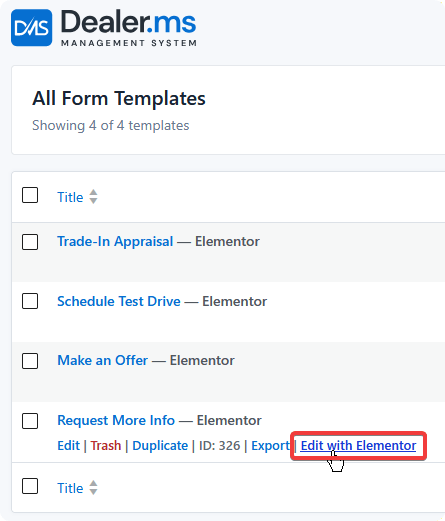
Start by creating a form or editing an existing one under Vehicles → Templates → Form — your listing type may be named something other than Vehicles — then edit the form in Elementor.
Mapping a field
When editing a DMS form field element, you can set where that field is inserted into Frazer when the lead is submitted.
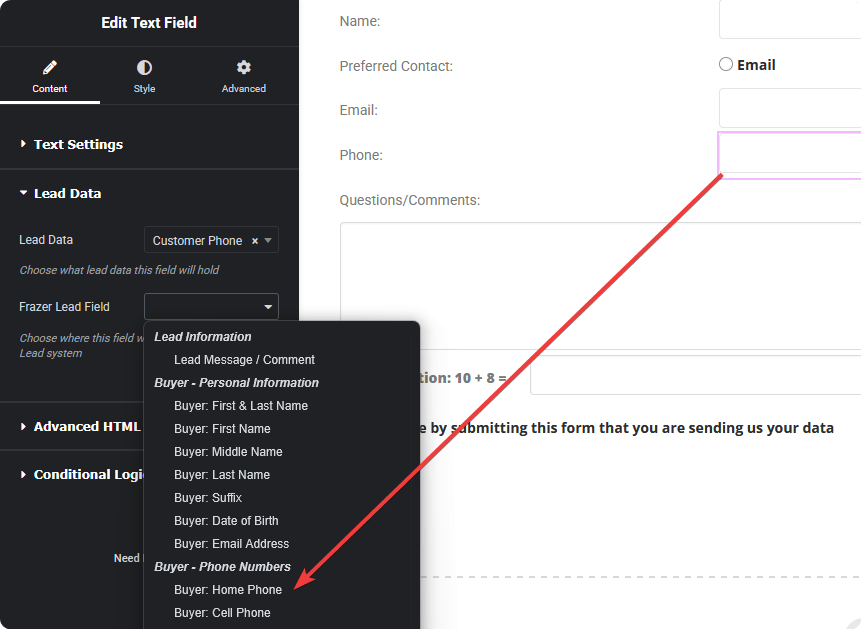
In the example above, the Phone field is set to insert into the Home Phone section in Frazer.
Every field you want in Frazer needs mapping individually. Fields left unmapped still work normally on your site and still appear in DMS leads — they simply aren't sent onward.
Leads submitted through the form are then fed into your Frazer system automatically.
Available Frazer lead fields
The dropdown groups Frazer's fields by section, so a full credit application can be captured if your form collects it.
| Group | Includes |
|---|---|
| Lead Information | Lead message / comment |
| Buyer — Personal | First, middle, last name, suffix, date of birth, email |
| Buyer — Phone Numbers | Home, cell, work phone and extension |
| Buyer — Home Address | Street, city, state, ZIP |
| Buyer — Driver License | Number, state, expiration |
| Co-Buyer — Personal | Name, suffix, date of birth, email |
| Vehicle Inquiry / Deal | Reference ID, display name, Frazer vehicle ID, description, agreed price, down payment |
| Trade-In Vehicle | VIN, year, make, model, trim, mileage, colour, allowance, payoff |
| Credit Application — Identity | SSN, marital status |
| Credit Application — Residence | Address, months at address, rent/own status, monthly payment |
| Credit Application — Employment | Status, employer, job title, months employed, monthly income, business phone |
| Credit Application — Banking | Bank name, phone, checking and savings account numbers |
There's a full-name field as well as separate first and last name fields — use whichever matches how your form collects it, rather than mapping both.
Credit application fields carry sensitive data
SSN, driver license numbers, and bank account numbers are among the mappable fields. Collecting them means handling that data on your website and transmitting it onward.
Only add those fields to a form if you genuinely need them, your site is served over HTTPS, and you understand your obligations for storing and retaining that information. A simple enquiry form doesn't need any of them.
Which vehicle a lead is attached to
Leads submitted from a listing page automatically carry that vehicle's identifier, so Frazer knows what the customer was asking about — no field mapping required for it.
A form submitted from a page with no vehicle in context sends the lead without a vehicle attached.
Building a useful lead form
A form that maps well to Frazer usually collects:
- Name and email, at minimum.
- A phone number, mapped to the field your team actually calls — Home, Cell, or Work.
- A message field, mapped to Lead Message / Comment, so the customer's own words carry through.
Trade-in fields are worth adding to a dedicated trade appraisal form rather than a general enquiry form, where they'd depress completion rates.