Scanning Terms
If you notice that your DMS terms are not showing up in WPML, you can force a scan by going to Dealer.ms → Settings, then under the WPML tab clicking the Start Scan button:
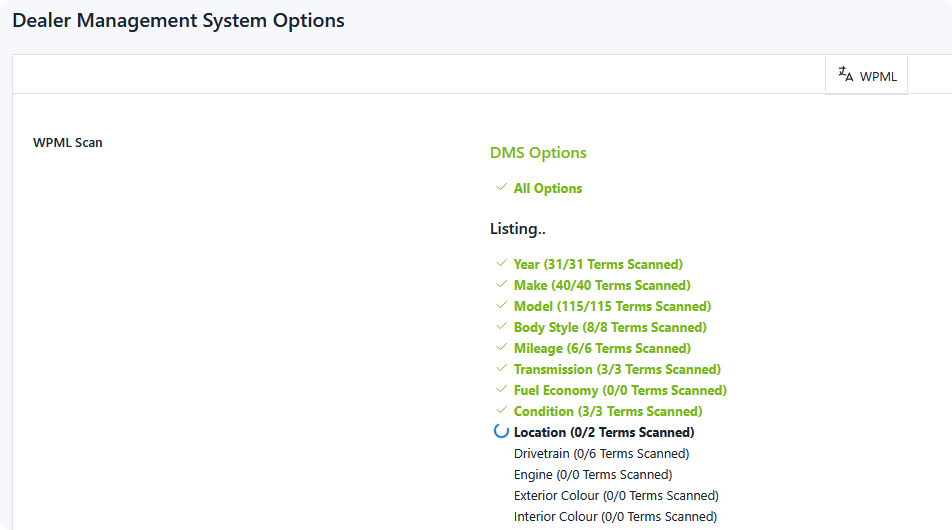
Afterwards all terms and categories will be translatable within WPML.
When you need to scan
A scan is a catch-up operation, not a routine one. DMS data you create after the extension is active registers itself with WPML the moment you save it — types, categories, terms, and badges alike. Renames and deletions are handled the same way.
Scan when:
- You have just activated the extension on a site with existing inventory data.
- You imported terms directly into the database, bypassing the DMS admin.
- A category's terms are missing from WPML and you can't account for why.
Running a scan again when everything is already registered is harmless — existing strings are simply re-registered with the same values.
What the scan covers
The panel lists DMS Options first, then one block per listing type, with each of that type's categories beneath it. As the scan runs, each category shows its progress as n/total Terms Scanned, and completed rows are marked with a check.
For each listing type the scan registers:
- The type's own translatable option values
- Each category's names
- Every badge on that type
- Every term inside each category
DMS Options is scanned separately and covers your global DMS option values.
Large categories are scanned in batches
Categories with more than 50 terms are split across multiple requests, 50 terms at a time, with the counter advancing as each batch completes. This keeps a category holding thousands of terms from exhausting PHP's execution time in a single request.
Leave the page open until every row reports complete. Navigating away mid-scan stops it, and any terms not yet reached stay unregistered — re-run the scan to finish.
The batch size can be changed with the dms_wpml_max_scan_amount filter if your server needs smaller chunks. See Developer Reference.
Once the scan reports All DMS terms can now be translated in WPML, move on to Translating.